
1. What is Core Web Vitals and Why Does It Determine Google Rankings?
A significant portion of mobile users abandon slow-loading pages before the content even appears. With its 2021 page experience update, Google added three user experience metrics under the name Core Web Vitals (Core Web Vitals) to its ranking signals. While content quality remains a decisive factor for a website to rank high in Google search results (SERP), a robust technical infrastructure and performance-driven web design standards provide a substantial advantage.
Many businesses fall into the misconception of associating site speed solely with the RAM or CPU capacity of the hosting package they purchase. However, performance issues encountered in the field usually stem not from the server, but from excessive visual weight in the interface design, unoptimized third-party JavaScript codes, and unnecessary CSS bloat.
Why Does It Matter? Pages that achieve 'Good' (Green) results in Core Web Vitals offer a faster and more stable experience to the visitor; this generally translates back as a lower bounce rate and higher form/sales conversion.
2. 2026 Core Web Vitals Metrics: LCP, INP, and CLS Thresholds
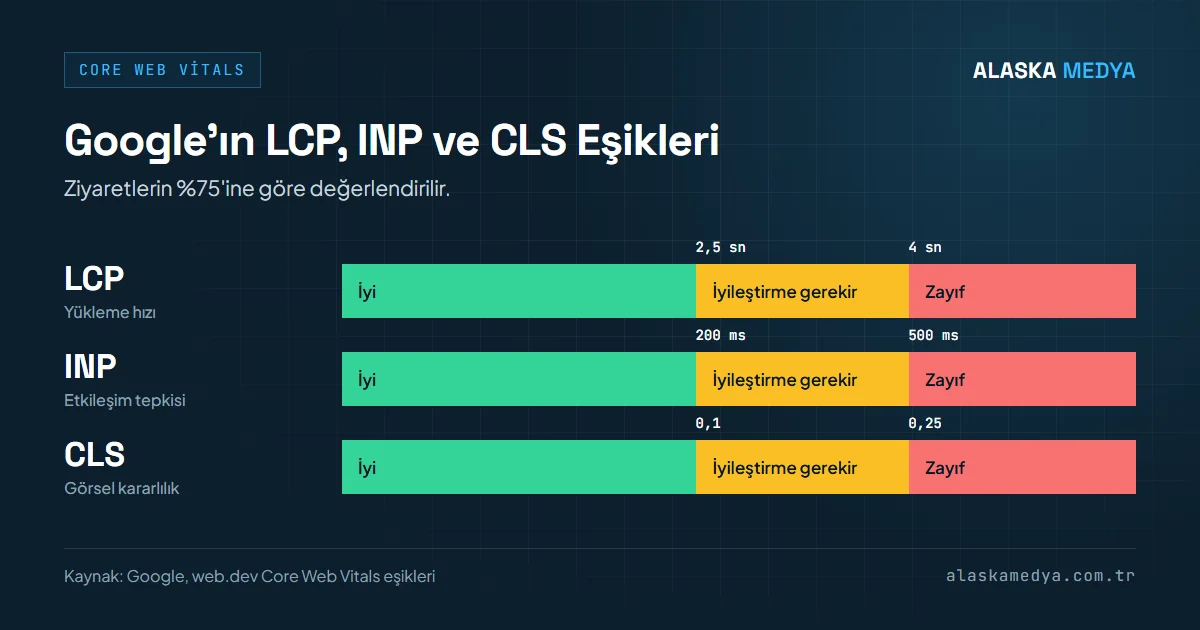
As of 2024, Google has completely retired the legacy First Input Delay (FID) metric and officially established the INP (Interaction to Next Paint) metric, which measures user interaction throughout the page lifecycle, as the standard. The 3 main metrics of current Core Web Vitals and their accompanying auxiliary indicators (TTFB, FCP) are as follows:
LCP (Largest Contentful Paint)
This is the time it takes for the largest content element in the viewport (Hero image or large heading) to appear on the screen when a user enters the page. It is the initial psychological moment when the user perceives that the site has loaded.
INP (Interaction to Next Paint)
This is the browser's delay in generating visual feedback (the next frame) on the screen after a user clicks a button or opens a menu. It is targeted to remain at or below 200 ms in 75% of visits.
CLS (Cumulative Layout Shift)
This measures the sudden shifting of texts or banner areas up and down while the page is loading. Unsized visuals lead to accidental clicks by users and a loss of trust.
TTFB (Time to First Byte)
This is the time elapsed from the initial request sent by the browser to the server until the server returns the first data byte. It is an auxiliary indicator; high TTFB delays all subsequent stages, including LCP.
| Metric | Good (Target) | Needs Improvement | SEO and Conversion Impact |
|---|---|---|---|
| LCP (Loading Speed) | ≤ 2.5 seconds | 2.5 sec - 4.0 sec | Directly affects the bounce rate and first impression. |
| INP (Interaction Responsiveness) | ≤ 200 milliseconds | 200 ms - 500 ms | Affects mobile navigation fluency and form completion rate. |
| CLS (Visual Stability) | ≤ 0.1 | 0.1 - 0.25 | Prevents users from clicking the wrong link, increases trust and session duration. |
| TTFB (First Byte Time) | ≤ 800 milliseconds | 800 ms - 1800 ms | Server response speed; part of LCP and FCP durations. |
| FCP (First Contentful Paint) | ≤ 1.8 seconds | 1.8 sec - 3.0 sec | Ends the white screen waiting time, establishes the brand's professional perception. |
3. Why Do Bloated Page Builders Slow Down Your Site?
The core structural problem of many sites built with heavy ready-made themes and page builders (Elementor, Divi, WPBakery, or ThemeForest templates) is that these tools try to be universal. A single theme contains dozens of different slider effects, hundreds of animation options, and extensive icon libraries. Even if you use only a small fraction of these features on your site, the browser may still be forced to download, parse, and execute a significant portion of the unused code.
Result: The limited processing capacity of mobile devices struggles to process these codes, the main thread can remain busy for seconds, and the mobile PageSpeed score drops significantly.
| Technical Parameter | Bloated Ready Theme / Page Builder | Alaska Medya Clean Coding |
|---|---|---|
| HTTP Request Count | 85 - 130 external requests | 12 - 22 optimized requests |
| Total Page Size | 4.5 MB - 8.2 MB (Heavy) | 450 KB - 850 KB (Ultra Lightweight) |
| DOM Depth & Node Count | 30+ levels / 2,500+ DOM Nodes | 6-8 levels / 350-500 DOM Nodes |
| Mobile PageSpeed Score | 25 - 45 / 100 (Red/Orange) | 90+ / 100 (Green) |
| LCP (Opening Speed) | 4.2 - 6.8 seconds (Poor) | Below the ≤ 2.5 sec threshold (Good) |
| INP (Click Latency) | 320 ms - 650 ms (Severe freezing) | ≤ 200 ms (Good) |
| CLS (Layout Shift) | 0.25 - 0.48 (Disturbing) | ≤ 0.1 (Good, stable layout) |
4. Alaska Medya Performance Engineering: 6 Technical Standards Achieving a 90+ PageSpeed Score
In Alaska Medya projects, speed is not a feature patched on later with a plugin (cache plugin, etc.); it is a core design discipline starting from the very first line of code. The 6 main pillars of the speed and SEO-oriented web design architecture we implement are:
Low-Dependency, Lightweight Code Architecture
Instead of heavy jQuery libraries or bulky external JavaScript packages, we use pure CSS and modern JavaScript (ECMAScript) wherever possible.
WebP & AVIF Next-Gen Images
Images are served with file sizes typically 30–50% smaller than JPEG/PNG (lossy compression). Visual-induced layout shifts (CLS) are prevented with precise width and height definitions.
Critical CSS and Asynchronous Management
Critical CSS codes of the above-the-fold screen are embedded inline. Remaining styles are loaded asynchronously, and scripts are deferred with defer to accelerate the first paint.
Font Display Swap & WOFF2
font-display: swap; is applied to prevent temporary invisibility of texts. Character sets are simplified (subset) and critical fonts are preloaded using preload.
HTTP/3 & Brotli Compression
Brotli compression reduces the transferred file size compared to Gzip; server response time (TTFB) is kept low via HTTP/3 and server-side caching.
Static Caching & Edge CDN
Database load is reduced through caching; cached pages are rapidly served to the user from the closest point via CDN in eligible projects.
5. The Direct Link Between Mobile Page Speed and Conversion Rates
The vast majority of corporate web traffic in Turkey occurs via smartphones. Mobile devices generally have weaker processors and variable cellular internet connections (4.5G/5G) compared to desktop computers. Therefore, a bulky page that runs fast on a desktop may take a long time to open on the phone of a customer in the metro or on the go.
Every extra delay in page load time can lead to losses in conversion rates, drops in page views, and a decline in customer satisfaction. For this reason, mobile-friendly design and speed optimization processes cannot be considered separately when shaping your company's digital presence.
Alaska Medya Performance Goal: In the web design and software projects we deliver, we target a 90+ score in the Google PageSpeed Insights mobile performance score and a 'Good / Green' result in Core Web Vitals.