
1. Visuals vs. Experience in Modern Web Design: The Distinction Between UI and UX
In the digital world, most businesses think that simply having a 'sleek-looking' website is enough. However, if striking colors or complex animations prevent users from quickly finding the information they are looking for, that site is a failed investment. Brands seeking to gain a competitive advantage in today's business world operate according to the principles of a user experience-focused web design agency, blending aesthetics with user-centric psychology.
UI (User Interface) is the color palette, typography, button styles, icons, and screen layout of a website. UX (User Experience), on the other hand, is the fluency, convenience, and cognitive effort level throughout the entire process from the moment a visitor enters your site to the moment they submit a quote request. While a great interface pleases the eye, a flawless experience effortlessly turns a visitor into a loyal customer.
Visual Interface (UI)
Typographic hierarchy, color contrast, 8-point grid alignments, button states (hover, active, disabled), and aesthetic integrity.
User Experience (UX)
Information architecture, reducing form friction, page load speed, one-click search capability, and intuitive navigation routes.
Golden Rule: The user doesn't notice a well-designed experience because everything flows smoothly as it should. However, a poorly designed experience causes the user to leave the site within a few seconds and never return.
2. Swiss Design Philosophy: Typography, Negative Space, and Mathematical Grid
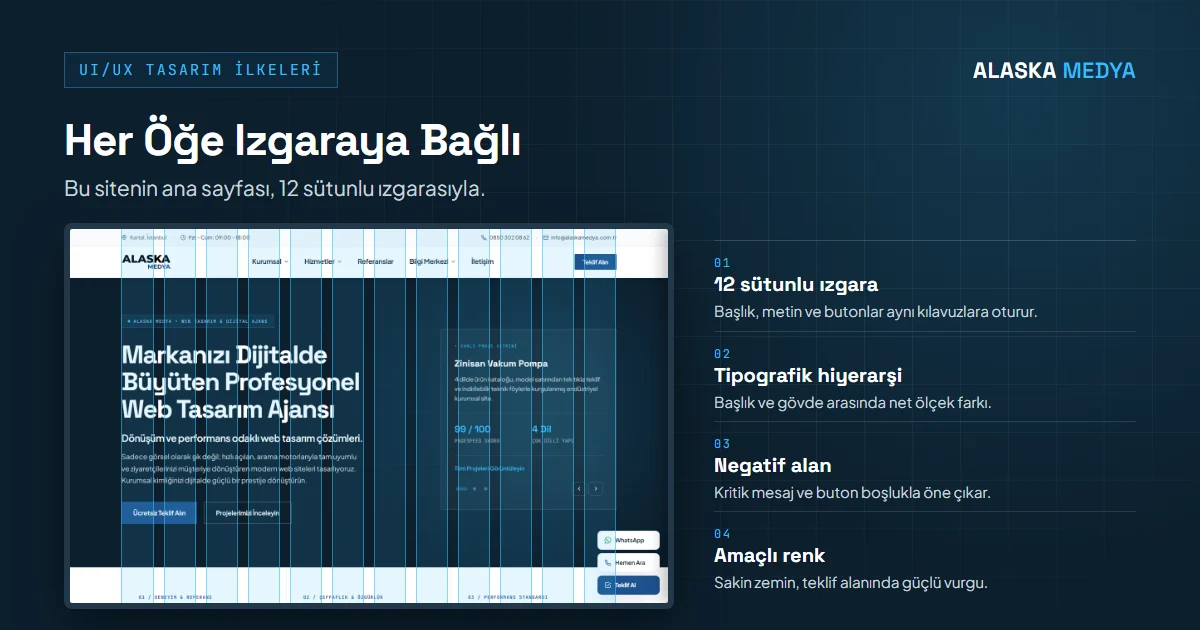
The core approach we adopt at the Alaska Medya design studio is the International Typographic Style (Swiss Style) discipline, which was born in Switzerland in the 1950s and is considered the foundation of modern digital interfaces. This approach is built upon four main pillars:
12-Column Grid Layout
All headings, paragraphs, images, and buttons lock into pixel-calculated vertical and horizontal guidelines. Not a single random element is placed on the screen.
Grotesque Clarity & Rhythm
Modern sans-serif fonts that maximize readability (e.g., Inter), mono fonts for technical tags (e.g., Roboto Mono), and precise point ratios between headings and body text.
Giving the Content Breathing Room
Instead of cluttering the screen with unnecessary banners and decorations, generous spacing allows the critical message and call-to-action buttons to stand out.
Purposeful Color Distribution
Calm monochrome tones (ink and anthracite) for backgrounds and body text, and high-contrast accents for purchase and quote areas that require attention.
3. Rules of Cognitive Psychology: Accelerating the User Decision-Making Process
The human brain avoids complexity and chooses the path that expends the least energy. Lowering cognitive load in user interfaces ensures that visitors quickly reach their goal without getting lost on your site. Especially in high-transaction-volume stores, applying user-friendly e-commerce interface design standards directly minimizes cart abandonment rates.
The 4 fundamental psychology laws strictly applied in Alaska Medya projects:
Hick's Law
As the number of options presented to a user increases, decision time increases logarithmically. Therefore, we simplify menus and define a single clear action goal (CTA) per page.
Fitts's Law
The time to reach a target depends on the distance to and size of the target. On mobile, we place critical buttons within the thumb reach zone (Thumb Zone) and provide adequate touch areas.
Miller's Law (The Rule of 7 ± 2)
According to Miller's classic study, the number of pieces of information short-term memory can hold simultaneously is limited; current research shows this limit may be even lower. We present navigation elements and service packages by grouping them (chunking).
Jakob's Law
Users spend most of their time on other websites. That's why we respect established habits, such as having the logo in the top left and the cart in the top right.
4. Comparison Matrix: Flawed UI/UX Practices vs. Alaska Medya Standards
A website transforming from an amateur showcase into a powerful sales tool happens through the following architectural discipline:
| Design Principle | Old / Flawed Design Habit | Modern Swiss & UX Standards |
|---|---|---|
| 1. Page Hierarchy | Every element being large, colorful, and shouting type | Clear H1-H6 hierarchy, content architecture readable at a glance |
| 2. Form Design | Long and exhausting forms with 12-15 questions | Only 3-4 critical fields, instant inline validation |
| 3. Typography Scale | Tiny, unreadable text of 12px and below on mobile screens | Minimum 16px base font, 1.6 line-height |
| 4. Button States | Static buttons that do not react when clicked | Micro-interactions (hover, focus, active, loading state) |
| 5. Negative Space | Adding banners to every corner so no empty space remains | Proportional white spaces that increase focus on content |
| 6. Mobile Navigation | Complex 4-level desktop menus | Clean bottom drawer or fixed tab bar navigation |
| 7. Visuals and Icons | Artificial and cliché stock photos | Original SVG vector icons and real corporate visuals |
| 8. Color Contrast | Light gray faded text on a gray background | WCAG AA compliant high contrast ratios (min. 4.5:1) |
| 9. Feedback | Page freezing or staying blank when a form is submitted | Clear success messages, loading bars, and instant notification |
| 10. Performance & Speed | Heavy video backgrounds and 5 MB images | WebP/AVIF formats and PageSpeed 90+ target |
5. Sample Scenario: UI/UX Redesign for a B2B Manufacturing Company
To examine how user experience principles translate into tangible business results, let's consider a sample scenario structured around a B2B manufacturing company exporting industrial machinery parts to the global market. The figures below do not belong to an actual client; they are sample values used to demonstrate typical problems and potential impacts.
Sample Profile: A B2B manufacturing company — an established manufacturing firm producing high-precision industrial spare parts and exporting to more than 15 countries.
Current Situation and Encountered Problems (Before Redesign)
Although the company in the sample scenario had more than 12,000 qualified B2B visitors per month, it was receiving only 4-5 quote requests per month from digital channels. Heatmap and session recording analyses conducted in the scenario identified the following critical UI/UX bottlenecks:
- Difficult Product Discovery: More than 400 technical products were listed with a complex PDF catalog logic; there was no search engine, and product filtering was not working.
- Tiresome Quote Process: To request a quote, users had to fill out a lengthy 16-field form, including their 10-digit tax number (88% of visitors were abandoning the form).
- Drawings Not Working on Mobile: Technical drawings overflowed the screen on mobile, and engineers could not view details because pinch-to-zoom was disabled.
Interventions Made with the Swiss UI/UX Approach
In this scenario, the interface was completely overhauled, and the site's architecture was redesigned in line with CRO strategies that convert visitors into customers and Swiss grid discipline:
One-Click Technical Filtering
The product range was supported by a fast Ajax search engine that instantly filters by diameter, tolerance, and alloy type. In the sample scenario, product discovery time dropped from 110 seconds to 6 seconds.
Smart 3-Step Quote Funnel
Instead of a single-piece 16-question form, a 3-step micro-form was structured where the user only enters the product quantity and email.
Vector SVG CAD Preview
Instead of heavy PDF downloads, lightweight SVG technical drawings rendered directly in the browser were integrated, making them viewable losslessly on mobile.
WhatsApp & Quick RFQ Integration
A one-touch technical specification upload (Dropzone) and instant RFQ creation button were fixed for international procurement specialists.
Results in the Sample Scenario (90-Day Measurement)
The indicators monitored with Google Analytics 4 and Hotjar for 90 days post-launch in such a redesign and the values in the sample scenario:
| Performance Metric | Old Interface (Before) | Alaska Medya Swiss UI/UX (After) |
|---|---|---|
| Monthly Qualified Quote Requests (RFQ) | Average of 4-5 requests per month | Average of 42 requests per month (+740% Increase) |
| Mobile Quote Form Completion Rate | 2.1% | 14.8% (+604% Improvement) |
| Time on Page (Average) | 48 seconds | 2 minutes 44 seconds |
| Bounce Rate | 68.4% | 28.1% (Noticeable Engagement) |
| Mobile Interaction Response (INP) | 420 ms (Needs Improvement) | Under 200 ms (Good) |
Scenario Summary: Design is not just about choosing 'pretty colors', but removing mental roadblocks in front of your customer. As in this sample scenario, modern UI/UX discipline can generate approximately 8 times more quote requests from the same traffic without increasing the advertising budget.
6. Our Related Guides on UI/UX and Conversion
You can review our other technical analyses prepared on this subject to transform your corporate digital presence into a flawless sales machine:
Conversion-Driven (CRO) Web Design
A/B testing, reducing form friction, and tactics for converting visitors into quote-requesting customers.
Website Redesign Guide
Protocol for migrating your old site to a next-generation modern architecture without experiencing SEO and organic traffic loss.
High-Converting Landing Page
Single-focus sales page architecture that increases the efficiency of your ad budget in Google Ads and Meta campaigns.
Website Maintenance and Updates
Regular security patches, speed optimization, and corporate continuity guide.